2026-01-30 04:15
ចង់ប្តូរការងារ ឬ កំពុងស្វែងរកការងារ ផ្វើសារឥឡូវនេះ
Answer 1
មេឃុំ/ចៅសង្កាត់ត្រូវបានជ្រើសរើសដោយការបោះឆ្នោតជាសកល។
សំនួរឬអត្ថបទទាក់ទង
សំនួរផ្សេងទៀត
អត្ថបទណែនាំ
How Digital Verification Solutions Are Simplifying Business Operations
ដោយ : ketki@zoop.energy 13 days ago
As businesses move towards digital operations, verifying customer identities and processing documents efficiently hav...
Planning a Diwali 2026 Road Trip? Check These Things Before You Go
ដោយ : marketing@mymotor.in 16 days ago
Here's what to do to get you prepared for your Diwali 2026 road trip. The checklist below will help you do a challan ...
Buying a Used Car Before Diwali? Unpaid Tolls Can Now Block Your NOC
ដោយ : ketki@zoop.energy 16 days ago
Challan checking before you buy a used car is becoming increasingly important as they could affect your NOC for not c...
Rajasthan Travel Guide: Where to Go, What to Eat and What I’d Skip
ដោយ : ketki@zoop.energy 19 days ago
I came back with 400 pictures, less money in my wallet and a firm belief that this is the best road trip in India. Be...
Is the Tesla Flying Car Legal in India? What the Rules Say About Road-Legal Vehicles
ដោយ : ketki@zoop.energy 27 days ago
I watched the Tesla Roadster fly three times before I stopped grinning. A car left a ramp, flipped in mid-air and lan...
How to Verify AI Answers About Challan Checking and RC Details Before You Act on Them
ដោយ : marketing@mymotor.in 1 month ago
Challan checking is now something many drivers try by asking an AI assistant, but an online challan check, an e chall...
Challan Check Rajasthan: What My Neighbour’s Scooter Taught Me
Buying a second-hand scooter or car in Rajasthan? Or not sure if your own vehicle has a pending fine? A quick challan...
Echallan Rajasthan: How to Check Your Challan Online, and Why EV Owners Need To
If you drive anywhere in Rajasthan, from Jaipur's busy junctions to the highways around Jodhpur and Udaipur, a traffi...
អត្តបទបន្ថែមទៀត
តើអ្វីទៅគឺជា Linux ?
ដោយ : លី ប៊ុនលាភ 10 months ago
1.អ្វីជា Linux ?
តើអ្វីទៅគឺជា Java Virtual Machine ?
Java Virtual Machine ជាម៉ាស៊ីនអរូបីដែលអនុញ្ញាត្តិអោយកុំព្យូទ័ររបស់អ្នកដំណើរការកម្មវិធី Java បាននៅក្នុងច្រើនប្រព័ន្ធប្រត្តិបត្តិការដូចជា Window Linux Mac os ។ល។
របៀបធ្វើ A/B Test Facebook Ads
ដោយ : Houng Lymeng 10 months ago
A/B Testing (ឬ Split Testing) សម្រាប់ Facebook Ads គឺជាដំណើរការនៃការពិសោធន៍ប្រៀបធៀប កំណែពីរផ្សេងគ្នា (Version A និង Version B) នៃធាតុផ្សំមួយនៃពាណិជ្ជកម្មរបស់អ្នក ដើម្បីកំណត់ថា Ads Contents ណាមួយដែលមានប្រសិទ្ធភាពជាងគេ។ គោលបំណង គឺដើម្បីស្វែងរកនូវអ្វីដែលទាក់ទាញទស្សនិកជនគោលដៅរបស់អ្នក និងជំរុញលទ្ធផលល្អបំ
ភាពខុសគ្នានៃ digital marketing officer និង digital marketing executive?
១. Digital Marketing Officer (កម្រិតប្រតិបត្តិការ)
តើមានវិធានការដូចម្ដេចដើម្បីឲ្យបុគ្គលម្នាក់ៗ មិនចង់ពុករលួយ មិនអាចពុករលួយ មិនហ៊ានពុករលួយ ក្នុងបរិបទប្រយុទ្ធប្រឆាំងអំពើពុករលួយ។
ដោយ : វឌ្ឍនៈ ឆន 1 year ago
២. វិធានការដើម្បីឱ្យបុគ្គលម្នាក់ៗ មិនចង់ពុករលួយ មិនអាចពុករលួយ មិនហ៊ានពុករលួយ ក្នុងបរិបទប្រយុទ្ធប្រឆាំងអំពើពុករលួយ៖
ចូររៀបរាប់ពីប្រភពនៃការបំពុលបរិស្ថាន?
១. ប្រភពនៃការបំពុលបរិស្ថានមានដូចជា៖
ចូរបង្ហាញទំនាក់ទំនងវិភាគ និងសំយោគ។
មុននឹងឈានទៅដល់ការបង្ហាញទំនាក់ទំនងវិភាគ និងសំយោគ យើងគួរស្វែងយល់អំំពីអត្ថន័យរបស់វិភាគ និងសំយោគជាមុនសិន។
ហេតុអ្វី Digital Marketers ក្នុងប្រទេសកម្ពុជា និយមប្រើប្រាស់ Facebook Ads Objective "Engagement" សម្រាប់ Campaign?
ដោយ : Houng Lymeng 1 year ago
Backlinks នៅក្នុង SEO ជាអ្វី?
Backlinks (ឬ Inbound Links) នៅក្នុង SEO គឺជាតំណភ្ជាប់ (hyperlinks) ពីគេហទំព័រផ្សេងទៀតដែលភ្ជាប់មកកាន់គេហទំព័ររបស់អ្នក។ ពួកវាប្រៀបដូចជាការគាំទ្រពីគេហទំព័រមួយទៅគេហទំព័រមួយទៀត។
តើ SQL គឺជាអ្វី?
អត្ថបទថ្មីៗទាក់ទងបទពិសោធន៍ផ្សេងៗ
I recently received an SMS saying I have a pending traffic challan. How can I tell if it is genuine or fake?
ដោយ : ketki@zoop.energy 1 month ago
I recently got a message saying my car had an unpaid traffic challan and telling me to make an online payment. As fake challan messages can seem very realistic I would not click the link and pay online.
អនុមោទនាថ្ងៃសីល
ដោយ : សេក្ខមាណព 5 months ago
ដោយ : Google Account 6 months ago
ម៉ាស៊ីនបោះពុម្ព Print អត់ចេញក្រដាស - Can’t print: Troubleshooting steps
ដោយ : Pich Yorn 6 months ago
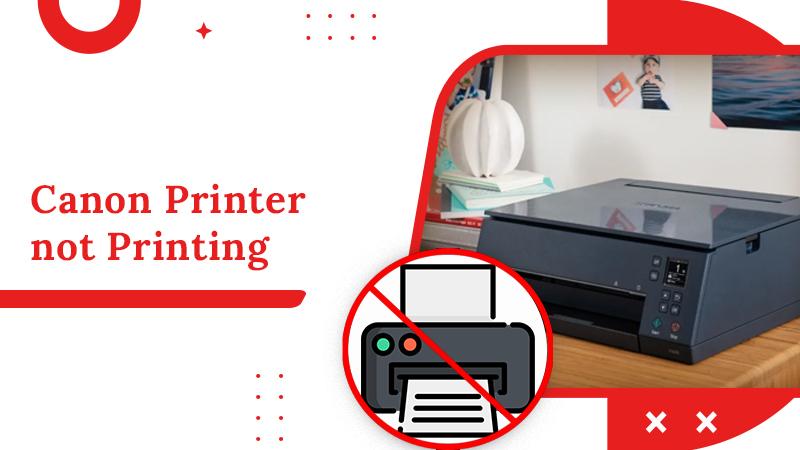
1. ពិនិត្យការតភ្ជាប់អ៊ីនធឺណិត ហើយ សាក Ping ទៅ IP Address របស់ម៉ាស៊ីន Print 2. ពិនិត្យការតភ្ជាប់បណ្តាញ(internet របស់ printer )នៅលើម៉ាស៊ីនបោះពុម្ព 3. ពិនិត្យថាប្រាកដមានដាក់ក្រដាសនៅក្នុងម៉ាស៊ីនហើយ (បើក្រដាសអស់ឬតិច ត្រូវបញ្ចូលក្រដាសបន្ថែម) 4. ពិនិត្យកម្រិតទឹកថ្នាំ/ទឹកម្សៅ (បើតិច នឹងមានការជូនដំណឹងលើអេក្រ
របៀបសំអាត file មិនសំខាន់ៗនៅក្នុង computer - Clean computer temp
ដោយ : Pich Yorn 7 months ago
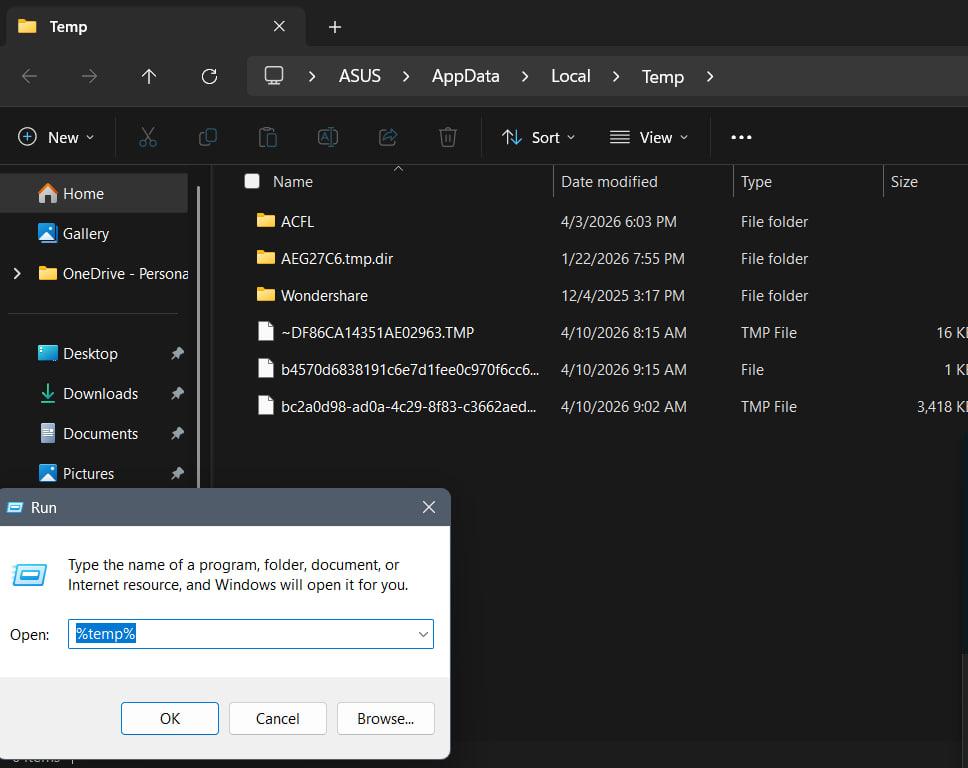
step 1: click Key Window + R => type %temp% => click Enter => Ctrl+A (setect all) => Delete => click ✅Do this for all current items => click continue or skip step 2: next type : temp Prefetch Note step 2 ធ្វើដូច step1 ដែរ
KhSearch Telegram Channel
Tips to earn more points:
Cancel Login
Tips for posting article:
Tips for posting experience:
There are many questions waiting your answers:
Login Register
Register Login
Please login to share your idea